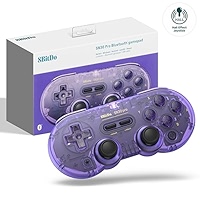
8-Bitdo produces some great Bluetooth controllers. I’ve owned multiple 8-Bitdo controllers, but I always end up trading them, selling them, or allowing someone to borrow them and never getting them back. I find one good thing about the controllers are that they connect so easily to computers. Whether that’s a Chromebook, a PC, a Mac, or an Android device. They are generally small (at least the versions based on the SNES pad are), light, and can be carried on trips. I’ve used 8-Bitdo controllers in the back of coaches, on trains, on planes, and in foreign countries.
The controller is utilitarian, as it functions well in multiple situations. That is partly because it looks great (looking great means it is more socially acceptable). The particular model that I’m reviewing today is the SN30 Pro (purple version). It is one of the best-looking and feeling controllers that I’ve ever owned. However, unfortunately, I’ve never been able to get these controllers to work with Switch 2. That is a huge drawback and has stopped this controller from being my main pad and my controller of choice in all settings. Read on for a review of the 8Bitdo SN30 Pro.

Aesthetics
The SN30’s design is based on the Super Nintendo gamepad. It is generally a smaller and sleeker gamepad in comparison with Sega’s 3-button Genesis/Megadrive pad. The SNES design, combined with dual analogue sticks, is very aesthetically pleasing with its curves and clickable analogue sticks. The purple semi-transparent version that I have is arguably (along with the green version) 8-bitdo’s best-looking controller. For a price of around £40, it is a bargain. Additionally, the controllers feel great. It almost melts into your hands. The buttons are seated perfectly, and have just the right amount of tightness around their rubber pads for a button press to feel good.
The analogue sticks are also top quality. They are similar to Switch Joy-Con analogue sticks. Interestingly, controllers released after 2024 use hall-effect sticks, and mine definitely do, as the image above shows. I never had stick drift issues with my past 8-bitdo controllers, but I guess Hall effect sticks are superior to non-Hall effect sticks. The d-pad on the controller is quite similar to the d-pad on my Ayneo Pocket Air Mini in that it is firm but not stiff. You have a lot of control over the angle of tilt. Overall, I’d say the d-pad is slightly inferior to the d-pad on the Ayneo Pocket Air Mini. I feel the latter is more firmly seated, and for that reason, you have more control over input.

Setup
I’ve had this controller for a few months now. I originally purchased it as I wanted to have a good controller that I could use on my new Switch 2, and also possibly use on my Chromebook. Of course, in that situation, a lot of people would go for an 8-bitdo controller, and that is what I did. It was a choice between the green transparent version and the purple transparent version. I can’t remember the reason I chose purple. However, long story short, the controller has spent a lot of time in its box, in a corner of a drawer.
That is because, unlike with the original Switch, which had great compatibility with many different controllers, Nintendo decided to annoy the community by making only specific controllers work with the system. So, I went to the trouble of buying a USB adapter from 8bitdo that would apparently allow the controller to work. What I didn’t realise is that the firmware that you need to add to the adapter or the controller only works on Windows or Mac, I only had a Chromebook. This meant I had to ask a friend to use their computer and update the firmware on the adapter. I did that, he returned it, but alas, the controller would not work. This may be because he didn’t install the firmware properly, but I decided I wouldn’t use the controller with Switch 2. So what I have been using it with is my Chromebook and my £70 Honor Tablet, which is surprisingly powerful. It can run GameCube and 3DS games.

Platforms
On both the tablet and my Chromebook, the 8bitdo SN30 Pro works very well. I didn’t have any problem with the controls in terms of wrong button input or lag. In fact, the controller works almost as well as the controls work on my Ayneo Pocket Air Mini. I’m thinking of purchasing both a Windows PC, and an original Switch. With the Windows device, I can try to correctly add the firmware and get the pad working with Switch 2. I’ve been playing a lot of 3DS games on my tablet with the SN30 Pro. The gameplay is buttery smooth due to the design of the controller. The pad is essentially compatible with everything apart from PlayStation and Xbox devices. You can get the controller to work with those platforms, but it will require adapters. The device is mainly used for Switch, Android, and PC, as far as I know.

Conclusion
To sum up, 8-bitdo is a company that is known to produce great controllers, and the SN30 Pro (Purple) is certainly one of them. With a stunning design and look, combined with tight control due to well-seated and well-cushioned buttons, this is a premium controller that you can get for a middle-of-the-road price. If you like small, sleek controllers rather than huge monstrosities like the Xbox Duke, then look no further than one of the SN30 variations. The controller might have compatibility issues with the Switch 2, which was a huge disappointment, but that is Nintendo’s fault, not 8-Bitdo’s. Furthermore, the firmware update will solve the issue for most people. If I’m ever travelling abroad to somewhere for work or family, I throw the SN30 Pro in my bag before even my tablet or Chromebook. It is an essential it of tech. Happy Gaming.

BongoBongo123 is an avid Zelda fan who also likes the odd game of Smash. His interests in gaming are broad but he loves a good Metroidvania or action RPGs.