
The humble Game Boy has become known as a great device to mod, especially by adding a backlit screen. If you go for an IPS screen, you could choose a Chinese unbranded one from Aliexpress or eBay, or you could go for a premium branded version, such as the IPS screens offered by Retrosix from the UK. The alternative to an IPS screen is adding small leds to the screen, which is difficult but can be done on the Game Boy, and Game Boy Pocket. Retrosix offers regular kits that can fit on original shells (with a bit of modification), or ‘laminated’ shells where the screen panel and lens are together in one component. This means the screen doesn’t get dusty, smudges don’t show, it’s less fiddly to install, and it arguably looks nicer when in action.
However, it can be more prone to smashing if you are silly enough to drop it on a hard surface. Whether you go for a regular CleanScreen kit or a laminated CleanScreen kit, what is special about this product is the CleanScreen board which is a new creation by RetroSix and works in a novel way compared to other kits. The new Retrosix screen functions more like the original screens in the way the display deals with transparency (however now in a backlit form). Read on for a review of Retrosix’s GBA CleanScreen Kit.
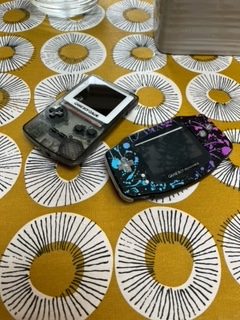
Installation
Game Boy modding is a great hobby and you don’t need to be a master at soldering to create something unique that works. However, even the most technically gifted modder would admit that modding isn’t without error and frustration. The Retrosix GBA CleanScreen Kit comes well packaged and you have the option of soldering or not. There is a button ribbon included which makes soldering easy. You just place the ribbon on the board and solder at predesignated points. This allows the player to select screen settings with buttons. Alternatively, you don’t need to include this, and the screen will work fine, but you won’t have the option to change screen settings. The ribbon really is a nice addition and is easier for the customer in comparison to other screen kits that include wires to solder.
To install, you open the doner console, unhook the locks for the screen, and calmly take steps to remove the motherboard. In the new shell, whether you are using a regular kit or the laminated version, place the new screen facing down on the shell. Then, attach the screen using the built-in ribbon cable to the CleanScreen board. It can be confusing to get the ribbons and CleanScreen board the right way around, but take your time, and look at the measurements. It should fit together quite snuggly. Make sure that you don’t tear the ribbon cable. Whether you have a 32-pin or 40-pin GBA, connect the correct ribbon cable to the CleanScreen board and to the GBA motherboard. Once that is done, put the console back together. You may have issues with how well everything fits together. Take your time and use screws to help the console fit properly. You may need to disassemble it a couple of times. Always make sure your batteries and your power source aren’t connected when re-assembling the console. This prevents the console from shorting. Overall, Retrosix has delivered an easy-to-assemble kit. Hopefully, when it’s all put together and you power on the machine, a nice Game Boy logo appears signaling that you have done everything right.
Picture Quality and Sound
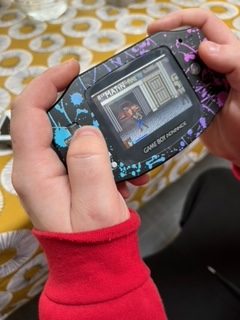
IPS kits generally produce a really good picture on Game Boy and Game Boy Advance. Most seem to be phone screens that have been altered to work with Game Boys. However, the RetroSix CleanScreen has been designed specifically for the Game Boy Advance, and as a result of this, the picture is not only bright and clean, but the screen works like an original GBA screen, which means it doesn’t flicker constantly like most IPS kits. This flickering is linked to transparency and more specifically is connected to seeing elements of the environment which could be behind, or in front of the main action. The Retrosix CleanScreen has the best and brightest visuals of all the branded and unbranded backlight GBA kits that I’ve used.
I’ve extensively played both the laminated and regular versions of the CleanScreen IPS kits. In Double Dragon GBA the blues and greens are rich and vibrant and the characters almost come alive as you fight your way through stage one. In Star Wars Episode 3 (another brawler, and a high-quality licensed Star Wars game) Obi Wan’s lightsaber looks lush and the progress of animation as the action goes on is fluid and everything flows well. Games like the two I’ve mentioned as they are ‘beat em’ ups’, are great showcases for the screen quality.
Battery Usage
The original iterations of the Game Boy, including the DMG, Pocket, and Color, had no backlight and this was great for battery life, as these consoles could go 7 or 8 hours with just a few household batteries. This is one of the reasons that the console sold so well, the great battery life. With the new IPS screens, they undoubtedly suck a lot of power, and that seven-hour battery life is reduced to 3 or 4 (if you’re lucky). The Retrosix CleanScreen board does its best to squeeze as much power as possible out of the batteries, but unfortunately, the GBA will only last two, three, or maybe four hours with regular batteries.
You can use battery mods, Retrosix themselves even supply some (made in-house), and these kits allegedly double the length of time that you can play. The GBA is a great-looking system with the Retrosix CleanScreen mod. The battery life is sufficient to get sucked into the experience if you are playing Pokemon, Metroid, or Zelda.
Conclusion
Overall, the Retrosix CleanScreen GBA kit is a powerhouse of an IPS kit. It produces some of the brightest and best visuals out of all the IPS kits. The unique way it works is faithful to the original GBA screen and is without a doubt a novel and cool piece of engineering. The button ribbon included in the kit is great for those who are beginners at soldering, and if you really don’t want to solder then you don’t have to.
Whether you choose the regular version or the laminated version, the screen is great to show off to friends, and I’d advise playing a bit of Double Dragon GBA on your modded machine to really impress friends and family. Unfortunately, the Retrosix Cleanscreen GBA kit uses a lot of power and its main drawback is that batteries won’t last nearly as long as using a non-backlit, original screen. However, that is its only main drawback, and if you are a budding modder, the Retrosix CleanScreen GBA Mod is an essential premium purchase.

BongoBongo123 is an avid Zelda fan who also likes the odd game of Smash. His interests in gaming are broad but he loves a good Metroidvania or action RPGs.